TransistorAuthorizationService
Client for the Transistor Software demo tracking server.
Transistor Software hosts a public demo server at tracker.transistorsoft.com that consumes location data from devices running the Background Geolocation SDK. You can also run a local instance — see background-geolocation-console.
The demo server is useful for evaluating the SDK or for sharing tracking results with Transistor Support when debugging.
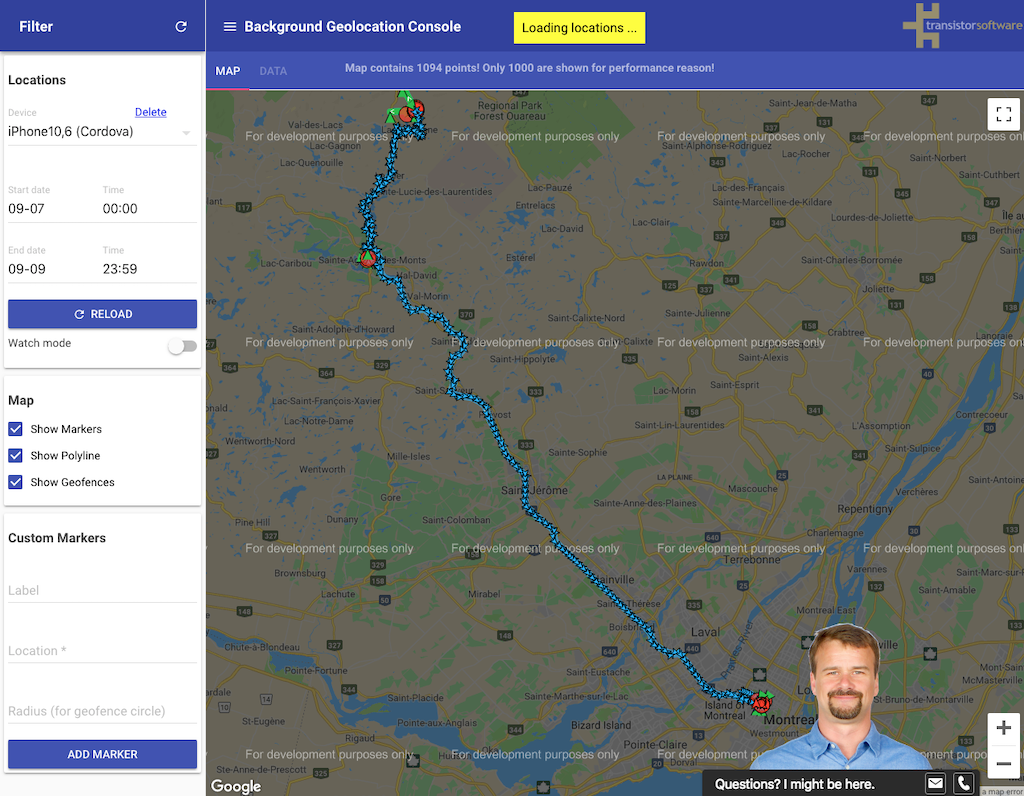
Viewing results
To view tracking results in a browser, visit:
https://tracker.transistorsoft.com/<your-organization-name>
final url = "https://tracker.transistorsoft.com";
final orgname = "my-company-name";
final username = "my-username";

// Fetch a token from the server (the SDK caches it automatically).
final token = await BackgroundGeolocation.findOrCreateTransistorAuthorizationToken(
  orgname, username, url
);

BackgroundGeolocation.ready(Config(
  transistorAuthorizationToken: token
));
Members
destroy
Remove the cached token associated with the given tracker URL.
// The url the token was registered with.
await TransistorAuthorizationToken.destroy("https://tracker.transistorsoft.com");

// If using a custom instance of Demo Server:
/// await TransistorAuthorizationToken.destroy("http://192.168.0.100:9000");
findOrCreate
static Future<TransistorAuthorizationToken> findOrCreate( String orgname, String username, [String url = _DEFAULT_TRANSISTOR_URL])
Find or create an authorization token for the given organization and username.
If a token already exists in the local cache for this orgName + url
combination, the cached token is returned. Otherwise a new token is
requested from the server and cached for future calls.
If the server refuses the registration (HTTP 403), the call fails: the Promise
rejects with an error whose status is 403, and in Dart the Future completes with
an error whose code is 403. Any other failure, such as no network connection,
returns a placeholder token whose accessToken is DUMMY_TOKEN. In the Kotlin and
Swift APIs, findOrCreateToken throws on any failure.
String orgname = "my-company-name";
String usernmae = "my-username";

// Fetch an authoriztion token from server.  The SDK will cache the received token.
TransistorAuthorizationToken token = await
  TransistorAuthorizationToken.findOrCreate(orgname, username);

BackgroundGeolocation.ready(Config(
  transistorAuthorizationToken: token
))