BackgroundGeolocation
Primary SDK API — the single entry point for all geolocation, geofencing, HTTP sync, and configuration operations.
Contents
Overview
The SDK operates around a motion-based state machine: it tracks aggressively while the device is moving and pauses location services when stationary, delivering high-quality background tracking with minimal battery impact.
| Area | Key methods |
|---|---|
| Lifecycle | ready, start, stop, setConfig, reset |
| Location | getCurrentPosition, watchPosition, getOdometer |
| Geofencing | addGeofence, startGeofences, onGeofence |
| Events | onLocation, onMotionChange, onHttp, onProviderChange |
| Persistence | getLocations, getCount, sync, destroyLocations |
| Background tasks | startBackgroundTask, stopBackgroundTask |
Lifecycle
Think of the SDK like a stereo receiver:
-
Wiring the speakers — Register event listeners (
onLocation,onGeofence, etc.) before callingready. The SDK buffers events untilreadyresolves, so listeners registered afterward may miss them. You do not need to remove listeners when you callstop— the SDK simply stops emitting events when it isn't running. -
Plugging in the power cord —
readyinitializes the SDK, restores persisted state, and applies your configuration. Call it once per launch, before any method that acquires a location or requests permissions. Your config is not applied untilreadyresolves. -
The power button —
startandstopbegin and halt location tracking. The SDK persists its enabled state across launches. If the app is terminated while tracking is active, the next call toreadywill automatically resume tracking — you do not need to callstartagain.
Always call ready on every launch — no exceptions. The SDK buffers all events from the
moment the app starts, and holds them until ready is called. If your app launches and
never calls ready, the SDK sits silently waiting: no events fire, no locations are
recorded, no uploads are attempted. It does not matter whether tracking was already active
from a previous session — ready is the signal that tells the SDK your app is alive and
listening. This is why the method is named ready.
Calling methods before ready resolves is perfectly fine, provided they do not request
a location or trigger a permission dialog. Methods that only read from the SDK's SQLite
database are safe — for example getState, getLocations, getGeofences,
removeGeofences. Avoid start, requestPermission, getCurrentPosition, and
watchPosition until after ready resolves. The SDK defaults apply until your config
arrives — calling a permission-sensitive method too early will use those defaults, not
your configured values.
Configuration
The SDK uses a compound-configuration model. Options are grouped into typed sub-interfaces (GeoConfig, HttpConfig, AppConfig, etc.) passed as a single Config object. All SDK constants are available as strongly-typed enum namespaces on the default export:
// Register event-listeners before calling .ready()
BackgroundGeolocation.onLocation((Location location) {
  print('[onLocation] ${location}');
});

BackgroundGeolocation.ready(Config(
  geolocation: GeoConfig(
    desiredAccuracy: DesiredAccuracy.high,
    distanceFilter: 20.0
  ),
  http: HttpConfig(
    url: "https://example.com/locations",
    autoSync: true
  ),
  persistence: PersistenceConfig(
    maxDaysToPersist: 7
  )
));
Events
Each onX method returns a Subscription that must be removed when
no longer needed:
These can also be imported individually
BackgroundGeolocation.onLocation((Location location) {
  print('New location: ${location}');
});

BackgroundGeolocation.onMotionChange((MotionChangeEvent event) {
  print('Device is moving? ${event.isMoving}');
});
Examples
final state = await BackgroundGeolocation.ready(Config(
  geolocation: GeoConfig( distanceFilter: 10.0 ),
  http: HttpConfig( url: "https://example.com/locations", autoSync: true )
));

if (!state.enabled) {
  await BackgroundGeolocation.start();
}
Compound configuration
// Register event-listeners before calling .ready()
BackgroundGeolocation.onLocation((Location location) {
  print('[onLocation] ${location}');
});

BackgroundGeolocation.ready(Config(
  geolocation: GeoConfig(
    desiredAccuracy: DesiredAccuracy.high,
    distanceFilter: 20.0
  ),
  http: HttpConfig(
    url: "https://example.com/locations",
    autoSync: true
  ),
  persistence: PersistenceConfig(
    maxDaysToPersist: 7
  )
));
Event listeners
BackgroundGeolocation.onLocation((Location location) {
  print('New location: ${location}');
});

BackgroundGeolocation.onMotionChange((MotionChangeEvent event) {
  print('Device is moving? ${event.isMoving}');
});
Removing event listeners
Getting started
final state = await BackgroundGeolocation.ready(Config(
  geolocation: GeoConfig( distanceFilter: 10.0 ),
  http: HttpConfig( url: "https://example.com/locations", autoSync: true )
));

if (!state.enabled) {
  await BackgroundGeolocation.start();
}
Events
onActivityChange
staticSubscriptiononActivityChange(Function(ActivityChangeEvent) callback)
Subscribe to motion-activity changes.
Fires each time the activity-recognition system reports a new activity
(still, on_foot, in_vehicle, on_bicycle, running).
Android
MotionActivityEvent.confidence always reports 100.
Subscription subscription = BackgroundGeolocation.onActivityChange((ActivityChangeEvent event) {
  print('[onActivityChange] ${event}');
});
activitychange
onAuthorization
staticSubscriptiononAuthorization(Function(AuthorizationEvent) callback)
Subscribe to Config.authorization events.
Fires when AuthorizationConfig.refreshUrl responds, either
successfully or not. On success, AuthorizationEvent.success is
true and AuthorizationEvent.response contains the decoded JSON
response. On failure, AuthorizationEvent.error contains the error
message.
Subscription subscription = BackgroundGeolocation.onAuthorization((AuthorizationEvent event) {
  print("[authorization] $event");

  if (event.success) {
    print("- Authorization response: ${event.response}");
  } else {
    print("- Authorization error: ${event.message}");
  }
});
authorization
onConnectivityChange
staticSubscriptiononConnectivityChange(Function(ConnectivityChangeEvent) callback)
Subscribe to network connectivity changes.
Fires when the device's network connectivity transitions between connected
and disconnected. By default, the SDK also fires this event at
start time with the current connectivity state. When connectivity
is restored and the SDK has queued locations, it automatically initiates
an upload to HttpConfig.url.
Subscription subscription = BackgroundGeolocation.onConnectivityChange((ConnectivityChangeEvent event) {
  print('[onConnectivityChange] ${event}');
});
connectivitychange
onEnabledChange
staticSubscriptiononEnabledChange(Function(bool) callback)
Subscribe to changes in plugin State.enabled.
Fires when State.enabled changes. Calling start or
stop triggers this event.
Subscription subscription = BackgroundGeolocation.onEnabledChange((bool isEnabled) {
  print('[onEnabledChanged] isEnabled? ${isEnabled}');
});
enabledchange
onGeofence
staticSubscriptiononGeofence(Function(GeofenceEvent) callback)
Subscribe to geofence transition events.
Fires when any monitored geofence crossing occurs.
See also - 📘 Geofencing Guide
Subscription subscription = BackgroundGeolocation.onGeofence((GeofenceEvent event) {
  print('[onGeofence] ${event}');
});
geofence
onGeofencesChange
staticSubscriptiononGeofencesChange(Function(GeofencesChangeEvent) callback)
Subscribe to changes in the set of actively monitored geofences.
Fires when the SDK's active geofence set changes. The SDK can monitor any number of geofences in its database — even thousands — despite native platform limits (20 for iOS; 100 for Android). It achieves this with a geospatial query that activates only the geofences nearest to the device's current location (see GeoConfig.geofenceProximityRadius). When the device is moving, the query runs periodically and the active set may change — that change triggers this event.
See also - 📘 Geofencing Guide
Subscription subscription = BackgroundGeolocation.onGeofencesChange((GeofencesChangeEvent event) {
  List<Geofence> on = event.on;   //<-- new geofences activated.
  List<String> off = event.off;   //<-- geofences that were just de-activated.

  // Create map circles
  on.forEach((Geofence geofence) {
    createGeofenceMarker(geofence);
  });

  // Remove map circles
  off.forEach((String identifier) {
    removeGeofenceMarker(identifier);
  });
});
geofenceschange
onHeartbeat
staticSubscriptiononHeartbeat(Function(HeartbeatEvent) callback)
Subscribe to periodic heartbeat events.
Fires at each AppConfig.heartbeatInterval while the device is in
the stationary state. On iOS, AppConfig.preventSuspend must
also be true to receive heartbeats in the background.
Note
The Location provided by the HeartbeatEvent is only the
last-known location — the heartbeat does not engage location services. To
fetch a fresh location inside your callback, call getCurrentPosition.
BackgroundGeolocation.ready(Config(
  heartbeatInterval: 60
));

Subscription subscription = BackgroundGeolocation.onHeartbeat((HeartbeatEvent event) {
  print('[onHeartbeat] ${event}');

  // You could request a new location if you wish.
  BackgroundGeolocation.getCurrentPosition(
    samples: 1,
    persist: true
  ).then((Location location) {
    print('[getCurrentPosition] ${location}');
  });
});
heartbeat
onHttp
staticSubscriptiononHttp(Function(HttpEvent) callback)
Subscribe to HTTP responses from your server HttpConfig.url.
See also
- HTTP Guide
Subscription subscription = BackgroundGeolocation.onHttp((HttpEvent event) {
  int status = event.status;
  bool success = event.success;
  String responseText = event.responseText;
  print('[onHttp] status: ${status}, success? ${success}, responseText: ${responseText}');
});
http
onLocation
staticSubscriptiononLocation(Function(Location) success, [Function(LocationError)? failure])
Subscribe to location events.
Every location recorded by the SDK is delivered to your callback, including
locations from onMotionChange, getCurrentPosition, and
watchPosition.
Error Codes
If the native location API fails, the error callback receives a LocationError code.
Note
During onMotionChange and getCurrentPosition, the SDK
requests multiple location samples to find the most accurate fix. These
intermediate samples are not persisted, but are delivered to this
callback with Location.sample set to true. Filter out sample
locations before manually posting to your server.
Subscription subscription = BackgroundGeolocation.onLocation((Location location) {
  print('[onLocation] success: ${location}');
}, (LocationError error) {
  print('[onLocation] ERROR: ${error}');
});
location
onLocationFilter
staticSubscriptiononLocationFilter(Function(LocationFilterEvent) callback)
Subscribe to location-filter rejection events.
Fires when the SDK rejects data before it reaches your stream — either a raw location sample dropped by the tracking location-filter, or a geofence trigger rejected as spurious or duplicate. See LocationFilterReason for the full list of LocationFilterEvent.reason values and what each means.
For geofence-trigger rejections, LocationFilterEvent.geofence is present —
it identifies the fence, the rejected transition (ENTER / EXIT), and why — and
LocationFilterEvent.location carries the trigger fix. It is undefined for
sample rejections, where LocationFilterEvent.trackingAccuracyThreshold applies.
Note
Rejected locations are not delivered to onLocation. The filter
silently drops them to keep your path and odometer clean, which means a long
run of poor fixes can leave onLocation quiet for an extended period.
Subscribe here to observe those rejections and adapt — for example, surface a
"poor GPS signal" hint to the user, or temporarily relax
LocationFilter.trackingAccuracyThreshold.
See also - LocationFilterReason - LocationFilter.trackingAccuracyThreshold
Subscription subscription = BackgroundGeolocation.onLocationFilter((LocationFilterEvent event) {
  print('[onLocationFilter] rejected: ${event.reason}, ${event.accuracy}');
});
locationfilter
onMotionChange
staticSubscriptiononMotionChange(Function(Location) callback)
Subscribe to motion-change events.
Fires each time the device transitions between the moving and stationary states.
Warning
When a motion-change event fires, HttpConfig.autoSyncThreshold is ignored — all queued locations are uploaded immediately. The SDK flushes eagerly before going dormant (moving→stationary) and immediately after waking up (stationary→moving).
See also - GeoConfig.stopTimeout
Subscription subscription = BackgroundGeolocation.onMotionChange((Location location) {
  if (location.isMoving) {
     print('[onMotionChange] Device has just started MOVING ${location}');
  } else {
     print('[onMotionChange] Device has just STOPPED:  ${location}');
  }
});
motionchange
onNotificationAction
staticSubscriptiononNotificationAction(Function(String) callback)
Android only Subscribe to button-click actions on the Android foreground-service notification.
Fires when the user taps a button defined in a custom NotificationConfig.layout.
BackgroundGeolocation.ready(Config(
  app: AppConfig(
    notification: Notification(
      actions: [  // <-- register button listeners
        "notificationButtonFoo",
        "notificationButtonBar"
      ]
    )
  )
));

// Listen to custom button clicks:
Subscription subscription = BackgroundGeolocation.onNotificationAction((String buttonId) {
  print("[onNotificationAction] - ${buttonId}");
  switch(buttonId) {
    case 'notificationButtonFoo':
      break;
    case 'notificationButtonBar':
      break;
  }
});
onPowerSaveChange
staticSubscriptiononPowerSaveChange(Function(bool) callback)
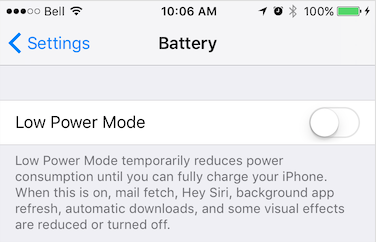
Subscribe to OS power-saving mode changes.
Fires when the operating system's power-saving mode is enabled or disabled. Power-saving mode can throttle background services such as GPS and HTTP uploads.
See also
- isPowerSaveMode
iOS
Power Saving mode is enabled manually in Settings → Battery or via an automatic OS prompt.
Android
Battery Saver is enabled manually in Settings → Battery → Battery Saver or automatically when the battery drops below a configured threshold.

Subscription subscription = BackgroundGeolocation.onPowerSaveChange((bool isPowerSaveMode) {
  print('[onPowerSaveChange] ${isPowerSaveMode}');
});
powersavechange
onProviderChange
staticSubscriptiononProviderChange(Function(ProviderChangeEvent) callback)
Subscribe to location-services authorization changes.
Fires whenever the state of the device's location-services authorization
changes (e.g. GPS enabled, WiFi-only, permission revoked). The SDK also
fires this event immediately after ready completes, so you always
receive the current authorization state on each app launch.
See also
- getProviderState
Subscription subscription = BackgroundGeolocation.onProviderChange((ProviderChangeEvent event) {
  print('[onProviderChange] ${event}');

  switch(event.status) {
    case ProviderChangeEvent.AUTHORIZATION_STATUS_DENIED:
      // Android & iOS
      print('- Location authorization denied');
      break;
    case ProviderChangeEvent.AUTHORIZATION_STATUS_ALWAYS:
      // Android & iOS
      print('- Location always granted');
      break;
    case ProviderChangeEvent.AUTHORIZATION_STATUS_WHEN_IN_USE:
      // iOS only
      print('- Location WhenInUse granted');
      break;
  }
});
providerchange
onSchedule
staticSubscriptiononSchedule(Function(State) callback)
Subscribe to AppConfig.schedule events.
Fires each time a schedule event activates or deactivates tracking.
Check state.enabled in your callback to determine whether tracking
was started or stopped.
Subscription subscription = BackgroundGeolocation.onSchedule((State state) {
  if (state.enabled) {
    print('[onSchedule] scheduled start tracking');
  } else {
    print('[onSchedule] scheduled stop tracking');
  }
});
schedule
Methods
changePace
static Future<State> changePace(bool isMoving)
Manually toggle the SDK's motion state between stationary and moving.
Passing true immediately engages location services and begins tracking,
bypassing stationary monitoring. Passing false turns off location
services and returns the SDK to the stationary state.
Use this in workout-style apps where you want explicit start/stop control independent of the device's motion sensors.
BackgroundGeolocation.changePace(true);  // <-- Location-services ON ("moving" state)
BackgroundGeolocation.changePace(false); // <-- Location-services OFF ("stationary" state)
getCurrentPosition
static Future<Location> getCurrentPosition(
Retrieve the current Location.
Instructs the SDK to fetch a single location at maximum power and accuracy. The location is persisted to SQLite and posted to HttpConfig.url just like any other recorded location. If an error occurs, the promise rejects with a LocationError.
Options
Error Codes
See LocationError.
Note
The SDK requests multiple location samples internally to find the best
fix. All intermediate samples are delivered to onLocation with
Location.sample set to true. Filter these out if you are
manually posting locations to your server.
Android: running without foreground-service permissions
In the FGS-permission-free configuration (see
GeoConfig.useSignificantChangesOnly), getCurrentPosition operates
best-effort: samples are fetched by an expedited WorkManager job instead
of a foreground service, honoring samples, desiredAccuracy and
maximumAge as usual. With the app in the foreground this behaves
identically to the fully-permissioned SDK; in the background, Android
throttles location delivery to unpromoted apps — expect slower fixes,
fewer samples, or a timeout.
Location location = await BackgroundGeolocation.getCurrentPosition(
  timeout: 30,          // 30 second timeout to fetch location
  maximumAge: 5000,     // Accept the last-known-location if not older than 5000 ms.
  desiredAccuracy: 10,  // Try to fetch a location with an accuracy of `10` meters.
  samples: 3,           // How many location samples to attempt.
  extras: {             // [Optional] Attach your own custom meta-data to this location.  This meta-data will be persisted to SQLite and POSTed to your server
    "foo": "bar"
  }
});
odometer
Retrieve the current odometer reading in meters.
The SDK continuously accumulates distance traveled between recorded locations.
Warning
Odometer accuracy depends on location accuracy. Noisy or inaccurate locations introduce error into accumulated distance. Use LocationFilter.odometerAccuracyThreshold to filter low-accuracy samples from odometer calculations.
See also
- LocationFilter.odometerAccuracyThreshold
- resetOdometer / setOdometer
ready
static Future<State> ready(Configconfig)
Signal to the SDK that your app is launched and ready, supplying the default Config.
Call ready exactly once per app launch, before calling start.
The SDK applies your configuration, restores persisted state, and prepares
for tracking. On subsequent launches after first install, it loads the
persisted configuration and merges your supplied Config on top.
See Config.reset for finer control over this behaviour.
Warning
Call ready once per app launch from your application root — not inside a
component or behind a UI action. On iOS, the OS can relaunch your app in
the background when the device starts moving; if ready is not called in
that path, tracking will not resume.
See also
- Config.reset
- setConfig
BackgroundGeolocation.ready(Config(
  desiredAccuracy: Config.DESIRED_ACCURACY_HIGH,
  distanceFilter: 10,
  stopOnTerminate: false,
  startOnBoot: true,
  url: 'http://your.server.com',
  headers: {
    'my-auth-token': 'secret-token'
  }
)).then((State state) {
  print('[ready] success: ${state}');
});
BackgroundGeolocation.reset();
// Reset to documented default-values with overrides
BackgroundGeolocation.reset(Config(
  distanceFilter:  10
));
registerHeadlessTask
static Future<bool> registerHeadlessTask( void Function(HeadlessEvent) callback)
Android only Registers a headless-task callback for Android background events when the
app has been terminated with AppConfig.stopOnTerminate:false. Requires
AppConfig.enableHeadless:true. React Native and Flutter only.
The callback receives a HeadlessEvent with a name (event name) and the event
data (params on React Native, event on Flutter).
Note
Cordova and Capacitor have no JavaScript headless mechanism: registerHeadlessTask
cannot run your callback there. On Android, receive headless events in a native Java or
Kotlin class instead — see Android Headless Mode.
Warning
You must call registerHeadlessTask in your application root file (index.js on React
Native, main.dart on Flutter), not inside a component or behind a UI action.
Warning
React Native: your function must be declared async. Await all work inside it — the
headless task is automatically terminated after the last line executes.
Debugging
While implementing your headless task, observe Android logs via:
On Flutter, replace ReactNativeJS:V with flutter:V.
See also - 📘 Android Headless Mode - AppConfig.enableHeadless
import 'package:flutter/material.dart';
import 'package:flutter_background_geolocation/flutter_background_geolocation.dart' as bg;

/// Receives all events from BackgroundGeolocation while app is terminated.
/// Must be a top-level or static function marked vm:entry-point, or release builds strip it.
@pragma('vm:entry-point')
void headlessTask(bg.HeadlessEvent headlessEvent) async {
  print('[HeadlessTask]: $headlessEvent');

  // Implement a 'case' for only those events you're interested in.
  switch(headlessEvent.name) {
    case bg.Event.TERMINATE:
      bg.State state = headlessEvent.event;
      print('- State: $state');
      break;
    case bg.Event.HEARTBEAT:
      bg.HeartbeatEvent event = headlessEvent.event;
      print('- HeartbeatEvent: $event');
      break;
    case bg.Event.LOCATION:
      bg.Location location = headlessEvent.event;
      print('- Location: $location');
      break;
    case bg.Event.MOTIONCHANGE:
      bg.Location location = headlessEvent.event;
      print('- Location: $location');
      break;
    case bg.Event.GEOFENCE:
      bg.GeofenceEvent geofenceEvent = headlessEvent.event;
      print('- GeofenceEvent: $geofenceEvent');
      break;
    case bg.Event.GEOFENCESCHANGE:
      bg.GeofencesChangeEvent event = headlessEvent.event;
      print('- GeofencesChangeEvent: $event');
      break;
    case bg.Event.SCHEDULE:
      bg.State state = headlessEvent.event;
      print('- State: $state');
      break;
    case bg.Event.ACTIVITYCHANGE:
      bg.ActivityChangeEvent event = headlessEvent.event;
      print('ActivityChangeEvent: $event');
      break;
    case bg.Event.HTTP:
      bg.HttpEvent response = headlessEvent.event;
      print('HttpEvent: $response');
      break;
    case bg.Event.POWERSAVECHANGE:
      bool enabled = headlessEvent.event;
      print('PowerSaveChangeEvent: $enabled');
      break;
    case bg.Event.CONNECTIVITYCHANGE:
      bg.ConnectivityChangeEvent event = headlessEvent.event;
      print('ConnectivityChangeEvent: $event');
      break;
    case bg.Event.ENABLEDCHANGE:
      bool enabled = headlessEvent.event;
      print('EnabledChangeEvent: $enabled');
      break;
  }
}

void main() {
  runApp(HelloWorld());

  // Register your headlessTask:
  bg.BackgroundGeolocation.registerHeadlessTask(headlessTask);
}
removeListeners
Remove all event listeners.
Calls Subscription.remove on all active subscriptions.
reset
static Future<State> reset([Config? config])
Reset the SDK configuration to documented default values.
If an optional Config is provided, it is applied after the reset.
BackgroundGeolocation.reset();
// Reset to default values with overrides
BackgroundGeolocation.reset(Config(
  geolocation: GeoConfig( distanceFilter: 10.0 )
));
setConfig
static Future<State> setConfig(Configconfig)
Update the SDK's Config at runtime.
The supplied Config is merged into the current configuration and
applied immediately. Use this after ready has been called to
change settings dynamically.
BackgroundGeolocation.setConfig(Config(
  desiredAccuracy: Config.DESIRED_ACCURACY_HIGH,
  distanceFilter: 100.0,
  stopOnTerminate: false,
  startOnBoot: true
)).then((State state) {
  print('[setConfig] success: ${state}');
})
setOdometer
static Future<Location> setOdometer(double value)
Set the odometer to an arbitrary value.
Internally performs a getCurrentPosition to record the exact
location where the odometer was set.
While tracking is disabled
The SDK will not switch location-services on just to set the odometer. When
State.enabled is false — or location-services are off, or location permission has not
been granted — no fix is acquired and the resolved Location is synthetic: it carries
the new odometer value, a timestamp and a uuid, but its coords are zeroes rather than a
position. Check State.enabled first if you need the location to be real.
BackgroundGeolocation.setOdometer(1234.56).then((Location location) {
  // This is the location where odometer was set at.
  print('[setOdometer] success: ${location}');
});
start
static Future<State> start()
Enable location and geofence tracking.
This is the SDK's power ON switch. The SDK enters its stationary state, acquires an initial location, then turns off location services until motion is detected. On Android, the Activity Recognition System monitors for motion; on iOS, a stationary geofence is created around the current location.
Note
If a AppConfig.schedule is configured, start overrides the
schedule and begins tracking immediately.
See also
- stop
- startGeofences
startGeofences
static Future<State> startGeofences()
Switch to geofences-only tracking mode.
In this mode no active location tracking occurs — only geofences are
monitored. Use the usual stop method to exit geofences-only mode.
start and startGeofences are mutually exclusive — call one or the
other, never both. start enables full tracking: location recording and
geofence monitoring run together. startGeofences enables geofence monitoring
only, with no continuous location recording. Calling start while already
in geofences-only mode (or vice versa) switches modes; there is no need to call
stop first.
See also
- stop
- 📘 Geofencing Guide
// Add a geofence.
BackgroundGeolocation.addGeofence(Geofence(
  notifyOnExit: true,
  radius: 200,
  identifier: 'ZONE_OF_INTEREST',
  latitude: 37.234232,
  longitude: 42.234234
));

// Listen to geofence events.
BackgroundGeolocation.onGeofence((GeofenceEvent event) {
  print('[onGeofence] - ${event}')
});

BackgroundGeolocation.ready(Config(
  url: 'http://my.server.com',
  autoSync: true
)).then((State state) {
  BackgroundGeolocation.startGeofences();
});
startSchedule
static Future<State> startSchedule()
Activate the configured AppConfig.schedule.
Initiates the schedule defined in AppConfig.schedule. The SDK
automatically starts or stops tracking according to the schedule. To halt
scheduled tracking, call stopSchedule.
See also
- AppConfig.schedule
- stopSchedule
Resolves the State once the scheduler is active, like start.
BackgroundGeolocation.startSchedule().then((State state) {
  print('[startSchedule] success: ${state.schedulerEnabled}');
});
stop
static Future<State> stop()
Disable location and geofence monitoring.
This is the SDK's power OFF switch.
Note
If a AppConfig.schedule is configured, stop does not halt
the scheduler. Call stopSchedule explicitly if you also want to
stop scheduled tracking (for example, on user logout).
// Later when you want to stop the Scheduler (eg: user logout)
BackgroundGeolocation.stopSchedule();
Stop tracking and the scheduler
// Later when you want to stop the Scheduler (eg: user logout)
BackgroundGeolocation.stopSchedule();
stopSchedule
static Future<State> stopSchedule()
Halt scheduled tracking.
Warning
stopSchedule does not call stop if the SDK is currently
tracking. Call stop explicitly if you also want to end the current
tracking session.
See also
- startSchedule
Resolves the State once the scheduler is halted, like stop.
BackgroundGeolocation.stopSchedule().then((State state) {
  print('[stopSchedule] success: ${state.schedulerEnabled}');
});
// Later when you want to stop the Scheduler (eg: user logout)
final state = await BackgroundGeolocation.stopSchedule();
if (state.enabled) {
  BackgroundGeolocation.stop();
}
watchPosition
Start a continuous stream of location updates.
Each location is persisted to SQLite (when the SDK is State.enabled) and posted to HttpConfig.url if HTTP is configured. Returns a Subscription that must be retained to halt the stream.
Warning
watchPosition is designed for foreground use only — not for long-term
background monitoring. The SDK's motion-based tracking model does not
require it.
Android: running without foreground-service permissions
In the FGS-permission-free configuration (see
GeoConfig.useSignificantChangesOnly), watchPosition remains
foreground-service-bound and is reliable only while the app is in the
foreground.
iOS
watchPosition continues running in the background, preventing iOS from
suspending your app. Remove the subscription in your app's suspend handler
to avoid draining the battery.
onResume() async {
  // Start watching position while app in foreground, retaining the return Subscription.
  watchPositionSubscription = await BackgroundGeolocation.watchPosition(
    {'interval': 1000, 'extras': {'foo': 'bar'}},
    (Location location) {
      print('[watchPosition] - ${location}');
    },
    (int errorCode) {
      print('[watchPosition] ERROR - ${errorCode}');
    }
  );
}

onSuspend() {
  // Halt watching position when app goes to background.
  watchPositionSubscription?.remove();
}
Geofencing
addGeofence
static Future<bool> addGeofence(Geofencegeofence)
Add a Geofence to be monitored by the native geofencing API.
Note
If a geofence with the same Geofence.identifier already exists,
it is deleted before the new one is inserted. When adding multiple
geofences, addGeofences is approximately 10× faster.
See also - 📘 Geofencing Guide
BackgroundGeolocation.addGeofence(Geofence(
  identifier: "Home",
  radius: 150,
  latitude: 45.51921926,
  longitude: -73.61678581,
  notifyOnEntry: true,
  notifyOnExit: false,
  notifyOnDwell: true,
  loiteringDelay: 30000,  // 30 seconds
  extras: {               // Optional arbitrary meta-data
    zone_id: 1234
  }
)).then((bool success) {
  print('[addGeofence] success');
}.catchError((error) {
  print('[addGeofence] FAILURE: ${error}');
});
addGeofences
static Future<bool> addGeofences(List<Geofence> geofences)
Add a list of Geofence to be monitored by the native geofencing API.
Note
If any geofence already exists with a matching Geofence.identifier, it is deleted before the new one is inserted.
See also
- 📘 Geofencing Guide
- addGeofence
List<Geofence> geofences = [
  Geofence(
    identifier: 'foo',
    radius: 200,
    latitude: 45.51921926,
    longitude: -73.61678581,
    notifyOnEntry: true,
  ),
  Geofence(
    identifier: 'bar',
    radius: 200,
    latitude: 45.51921926,
    longitude: -73.61678581,
    notifyOnEntry: true,
  )
];

BackgroundGeolocation.addGeofences(geofences);
geofenceExists
Determine whether a geofence with the given identifier exists in the SDK's database.
See also - 📘 Geofencing Guide
final exists = await BackgroundGeolocation.geofenceExists("HOME");
print('[geofenceExists]  ${exists}');
getGeofence
static Future<Geofence?> getGeofence(String identifier)
Fetch a single Geofence by identifier from the SDK's database.
See also - 📘 Geofencing Guide
Geofence geofence = await BackgroundGeolocation.getGeofence("HOME");
print('[getGeofence HOME: ${geofence}');
geofences
static Future<List<Geofence>> get geofences
Fetch all Geofence records from the SDK's database.
Returns an empty array if no geofences are stored.
See also - 📘 Geofencing Guide
removeGeofence
Remove the Geofence with the given Geofence.identifier.
See also - 📘 Geofencing Guide
BackgroundGeolocation.removeGeofence("Home").then((success) {
  print('[removeGeofence] success');
}).catchError((error) {
  print('[removeGeofence] FAILURE:  ${error}');
});
removeGeofences
Remove all monitored Geofence records, or a specific subset by identifier.
See also - 📘 Geofencing Guide
Data Management
destroyLocation
Remove a single location by Location.uuid.
Resolves true once the record is removed.
try {
  await BackgroundGeolocation.destroyLocation(location.uuid);
} catch(error) {
  print("[destroyLocation] failed: $error");
}
destroyLocations
Remove all records from the SDK's SQLite database.
Resolves true once the store is cleared, like the geofence mutators.
count
Retrieve the count of all locations currently stored in the SDK's SQLite database.
getLocations
static Future<List> getLocations([LocationQuery? query])
Retrieve Location records stored in the SDK's SQLite database.
Provide an optional LocationQuery to page through a large table, constraining results by limit, starting offset (or page), and sort order. Without a query, every record is returned in a single call — which can exhaust memory on a table of several thousand records, so prefer paging for large datasets. Size your paging with BackgroundGeolocation.getCount.
// All records
List locations = await BackgroundGeolocation.getLocations();

// One page of 500, newest first
List page = await BackgroundGeolocation.getLocations(LocationQuery(
  limit: 500,
  page: 0,
  order: LocationQuery.ORDER_DESC
));
insertLocation
Manually insert a location record into the SDK's SQLite database.
The record is stored as given — the SDK does not overwrite its timestamp, activity, is_moving, odometer, battery, or other fields with current device state. This is intended for importing history or externally-sourced fixes the SDK did not record itself. Only coords (latitude and longitude) is required; a missing or unparseable timestamp defaults to the current time. Resolves with the uuid of the inserted record — the SDK generates one when the caller does not supply a uuid.
Note
insertLocation deliberately bypasses PersistenceConfig.persistMode — an explicit insert always writes to the database, regardless of the configured persistence mode. For recording the device's own position on demand, prefer getCurrentPosition.
String uuid = await BackgroundGeolocation.insertLocation({
  "timestamp": "2024-01-15T10:30:00.000Z",
  "coords": {"latitude": 45.5152, "longitude": -73.6104},
  "extras": {"source": "import"}
});
print("[insertLocation] inserted record: $uuid");
sync
Manually upload all queued locations to HttpConfig.url.
Initiates a POST of all records in the SQLite database to your configured
HttpConfig.url. Records that receive a 200 OK response are
deleted from the database. If HttpConfig.batchSync is true, all
locations are sent in a single request; otherwise one request is made per
location. If no HTTP service is configured, all records are deleted from
the database.
See also
- HTTP Guide
BackgroundGeolocation.sync((List records) {
  print('[sync] success: ${records}');
}).catchError((error) {
  print('[sync] FAILURE: ${error}');
});
Authorization
providerState
static Future<ProviderChangeEvent> get providerState
Retrieve the current location-services authorization state.
See also
- onProviderChange to subscribe to future authorization changes.
final providerState = await BackgroundGeolocation.providerState;
print('- Provider state:  ${providerState}');
requestPermission
static Future<int> requestPermission([Permission? permission])
Requests location and motion permission — together, or each one separately.
With no argument, requests everything the current configuration requires:
location per GeoConfig.locationAuthorizationRequest, then the motion
permission — the same set start requests. Pass a Permission to
request one permission at a time and control exactly when each system dialog
appears:
| Argument | Requests | Resolves with |
|---|---|---|
| (none) | Location per configuration, then motion | The location AuthorizationStatus; the motion outcome stays silent |
Permission.Location |
Location only — motion untouched | The location AuthorizationStatus |
Permission.Motion |
Motion only | AuthorizationStatus.Always when granted |
The location forms resolve when either WhenInUse or Always is granted,
regardless of the configured level, and resolve immediately when permission is
already granted. Denial rejects with the bare AuthorizationStatus value.
The no-argument form skips the motion step when
ActivityConfig.disableMotionActivityUpdates is true — and, on iOS, when
NSMotionUsageDescription is absent from Info.plist (requesting motion without
it would terminate the app).
Each call is independently awaitable: the returned promise settles only when
its own request fully resolves, and the SDK serializes permission requests
internally — await one call, then issue the next, and each dialog appears in
order, never stacked.
Android
A motion denial rejects with AuthorizationStatus.Denied while a new request can still show the system dialog, and with AuthorizationStatus.DeniedAlways once Android permanently denies the permission (two user denials) — after that, only the device's app-settings screen can restore it.
iOS
The motion permission is one-shot — iOS never re-prompts. A user denial rejects with AuthorizationStatus.DeniedAlways: the state is permanent and only the Settings app can restore it (the motion form never rejects with plain AuthorizationStatus.Denied). The rejection can also carry AuthorizationStatus.Restricted (system-wide Fitness Tracking is off or the hardware is absent — not recoverable from the app's own Settings page) or AuthorizationStatus.NotDetermined (no dialog could be shown, e.g. the app was backgrounded). If the location dialog has already been shown and the current grant does not match the configured request, the SDK presents an alert offering to direct the user to the app's Settings page.
Note
The SDK automatically requests every required permission when you call
start, startGeofences, or getCurrentPosition. Calling
this method first resolves the dialogs ahead of time, so those methods find
everything granted and show nothing.
See also
- Permission
- GeoConfig.locationAuthorizationRequest
- ActivityConfig.disableMotionActivityUpdates
- GeoConfig.disableLocationAuthorizationAlert
- GeoConfig.locationAuthorizationAlert
- AppConfig.backgroundPermissionRationale (Android)
- requestTemporaryFullAccuracy (iOS 14+)
Request each permission separately
int locationStatus = await BackgroundGeolocation.requestPermission(Permission.location);
print("[requestPermission] location: $locationStatus");

try {
  int motionStatus = await BackgroundGeolocation.requestPermission(Permission.motion);
  print("[requestPermission] motion: $motionStatus");
} catch (status) {
  if (status == ProviderChangeEvent.AUTHORIZATION_STATUS_DENIED_ALWAYS) {
    // Only the app-settings screen can restore the motion permission now.
  }
}
Request everything at once
void initPlatformState() async {
  // Listen to onProviderChange to be notified when location authorization changes occur.
  BackgroundGeolocation.onProviderChange((event) {
    print("[providerchange] $event");
  });

  // First ready the plugin with your configuration.
  await BackgroundGeolocation.ready(Config(
    geolocation: GeoConfig(locationAuthorizationRequest: 'Always')
  ));

  // Manually request permission with configured locationAuthorizationRequest.
  try {
    int status = await BackgroundGeolocation.requestPermission();
    if (status == ProviderChangeEvent.AUTHORIZATION_STATUS_ALWAYS) {
      print("[requestPermission] Authorized Always $status");
    } else if (status == ProviderChangeEvent.AUTHORIZATION_STATUS_WHEN_IN_USE) {
      print("[requestPermission] Authorized WhenInUse: $status");
    }
  } catch(error) {
    print("[requestPermission] DENIED: $error");
  }
}
requestTemporaryFullAccuracy
Request temporary full-accuracy location authorization. [iOS 14+]
iOS 14 allows users to grant only reduced location accuracy. This method
presents the system dialog
(requestTemporaryFullAccuracyAuthorization)
requesting full accuracy for the lifetime of the current app session.

Configuration — Info.plist
Add the Privacy - Location Temporary Usage Description Dictionary key
to your Info.plist:

The dictionary keys (e.g. Delivery) are passed as purposeKey. The
corresponding value is the message shown to the user explaining the
purpose of your request.
The dialog fails to present if:
- The Info.plist entry for purposeKey is missing.
- The app is already authorized for full accuracy.
- The app is in the background.
Note
On Android and iOS versions below 14, this method returns AccuracyAuthorization.Full immediately without presenting a dialog.
See also - ProviderChangeEvent.accuracyAuthorization
BackgroundGeolocation.onProviderChange((ProviderChangeEvent event) {
  if (event.accuracyAuthorization == ProviderChangeEvent.ACCURACY_AUTHORIZATION_REDUCED) {
    // Supply "Purpose" key from Info.plist as 1st argument.
    BackgroundGeolocation.requestTemporaryFullAccuracy("Delivery").then((int accuracyAuthorization) {
      if (accuracyAuthorization == ProviderChangeEvent.ACCURACY_AUTHORIZATION_FULL) {
        print("[requestTemporaryFullAccuracy] GRANTED:  $accuracyAuthorization");
      } else {
        print("[requestTemporaryFullAccuracy] DENIED:  $accuracyAuthorization");
      }
    }).catchError((error) {
      print("[requestTemporaryFullAccuracy] FAILED TO SHOW DIALOG: $error");
    });
  }
});
Background Tasks
startBackgroundTask
Signal to the OS that you need to perform a long-running task.
The OS keeps the app running in the background until you signal completion
with stopBackgroundTask. Your callback receives a taskId which
you must pass to stopBackgroundTask when finished — always call it,
even if an error occurs, to avoid hanging the background task.
iOS
Uses beginBackgroundTaskWithExpirationHandler.
iOS provides exactly 180 seconds of background time. The SDK
automatically stops the task before the OS force-kills the app.
✅-[BackgroundTaskManager createBackgroundTask] 1
✅-[BackgroundTaskManager stopBackgroundTask:]_block_invoke 1 OF (1)
Android
Uses WorkManager.
The SDK imposes a 3-minute limit before automatically force-killing
the task.
 I TSLocationManager: [c.t.l.u.BackgroundTaskManager onStartJob] ⏳ startBackgroundTask: 6
 I TSLocationManager: [c.t.l.u.BackgroundTaskManager$Task stop] ⏳ stopBackgroundTask: 6
BackgroundGeolocation.startBackgroundTask().then((int taskId) {
  // Perform some long-running task (eg: HTTP request)
  performLongRunningTask.then(() {
    // When your long-running task is complete, signal completion of taskId.
    BackgroundGeolocation.finish(taskId);
  });
});
stopBackgroundTask
Signal completion of a startBackgroundTask to the OS.
The OS may now suspend the app if appropriate.
BackgroundGeolocation.startBackgroundTask().then((int taskId) {
  // Perform your long-running task here
  BackgroundGeolocation.stopBackgroundTask(taskId);
}).catchError((error) {
  // Be sure to catch errors: never leave your background-task hanging.
  print('${error}');
  BackgroundGeolocation.stopBackgroundTask(0);
});
Logging
playSound
Play a system sound.
iOS
Provide a numeric SystemSoundID.
Android
Provide a sound name string.
Properties
sensors
static Future<Sensors> get sensors
Sensors API — query the device motion hardware.
state
static Future<State> get state
Read-only snapshot of the SDK's current runtime state.