Geofence
A geofence definition for monitoring circular or polygon regions.
The SDK implements the native iOS and Android Geofencing APIs, extended with polygon support and a proximity-based infinite-geofencing system that overcomes the platform limits of 20 (iOS) and 100 (Android) simultaneous geofences.
Contents
- Overview
- Adding geofences
- Listening for events
- Polygon geofencing
- Infinite geofencing
- Removing geofences
- Geofences-only mode
- Examples
Overview
| Field | Required | Description |
|---|---|---|
identifier |
✅ | Unique name for this geofence. |
latitude |
✅* | Center latitude (*omit for polygon geofences). |
longitude |
✅* | Center longitude (*omit for polygon geofences). |
radius |
✅* | Radius in meters (*omit for polygon geofences). |
notifyOnEntry |
— | Fire event on entry. |
notifyOnExit |
— | Fire event on exit. |
notifyOnDwell |
— | Fire event after loitering for loiteringDelay ms. |
vertices |
— | Polygon geofence vertices (replaces lat/lng/radius). |
extras |
— | Arbitrary key-value metadata posted with each event. |
Warning
Both platforms require GeoConfig.locationAuthorizationRequest to be
"Always". Geofencing does not work with "WhenInUse" only.
Adding geofences
Use BackgroundGeolocation.addGeofence for a single geofence, or BackgroundGeolocation.addGeofences for bulk inserts (approximately 10× faster than inserting individually).
If a geofence with the same identifier already exists in the
database, it is replaced.
BackgroundGeolocation.addGeofence({
  identifier: "Home",
  radius: 200,
  latitude: 45.51921926,
  longitude: -73.61678581,
  notifyOnEntry: true,
  notifyOnExit: true,
  extras: { route_id: 1234 }
});
await BackgroundGeolocation.addGeofences([{
  identifier: "Home",
  radius: 200,
  latitude: 45.51921926,
  longitude: -73.61678581,
  notifyOnEntry: true,
}, {
  identifier: "Work",
  radius: 200,
  latitude: 45.61921927,
  longitude: -73.71678582,
  notifyOnEntry: true
}]);
Listening for events
Subscribe to geofence transitions with BackgroundGeolocation.onGeofence. Subscribe to changes in the actively monitored set with BackgroundGeolocation.onGeofencesChange.
BackgroundGeolocation.onGeofence((event) => {
  console.log("[onGeofence]", event.identifier, event.action);
});

BackgroundGeolocation.onGeofencesChange((event) => {
  const on = event.on;   // newly activated geofences
  const off = event.off; // deactivated geofence identifiers

  on.forEach((geofence) => createGeofenceMarker(geofence));
  off.forEach((identifier) => removeGeofenceMarker(identifier));
});
Note
When all geofences are removed, BackgroundGeolocation.onGeofencesChange
fires with empty arrays for both on and off.
Polygon geofencing
The SDK supports polygon geofences of any shape via the vertices
field. Polygon geofencing is
sold as a separate add-on
but is fully functional in DEBUG builds.
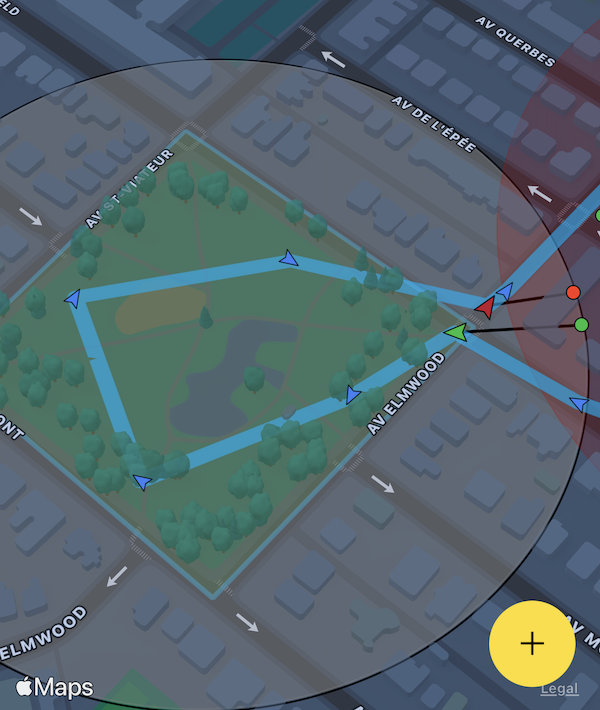
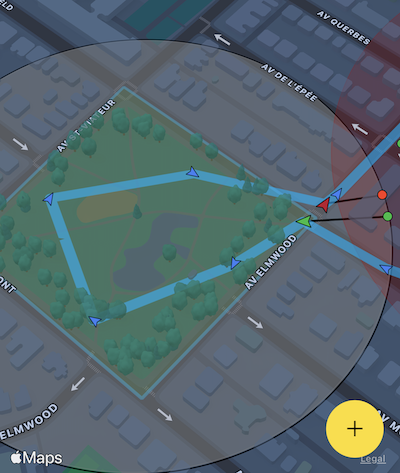
When defining a polygon geofence, omit latitude, longitude,
and radius — the SDK calculates the minimum enclosing circle
automatically from the polygon geometry.

BackgroundGeolocation.addGeofence({
  identifier: "Park",
  notifyOnEntry: true,
  notifyOnExit: true,
  vertices: [
    [45.518947279987714, -73.6049889209514],
    [45.5182711292279,   -73.60338649600598],
    [45.517082240237634, -73.60432670908212],
    [45.51774871402813,  -73.60604928622278]
  ]
});
Infinite geofencing
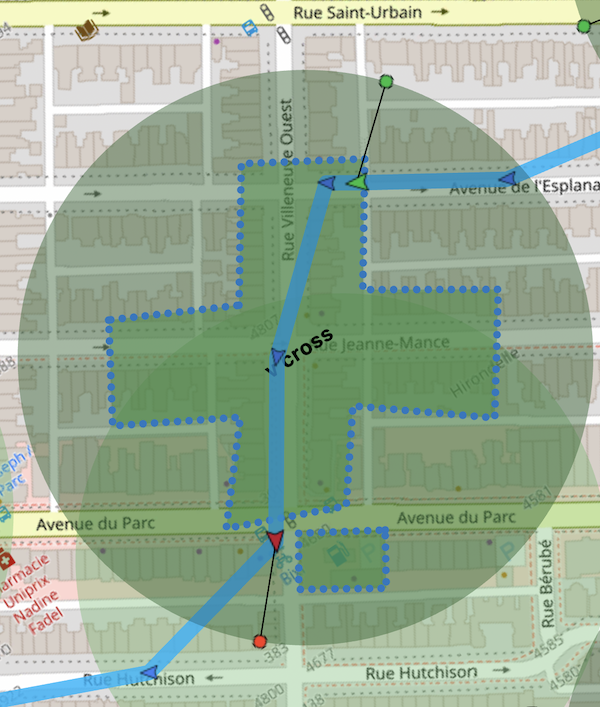
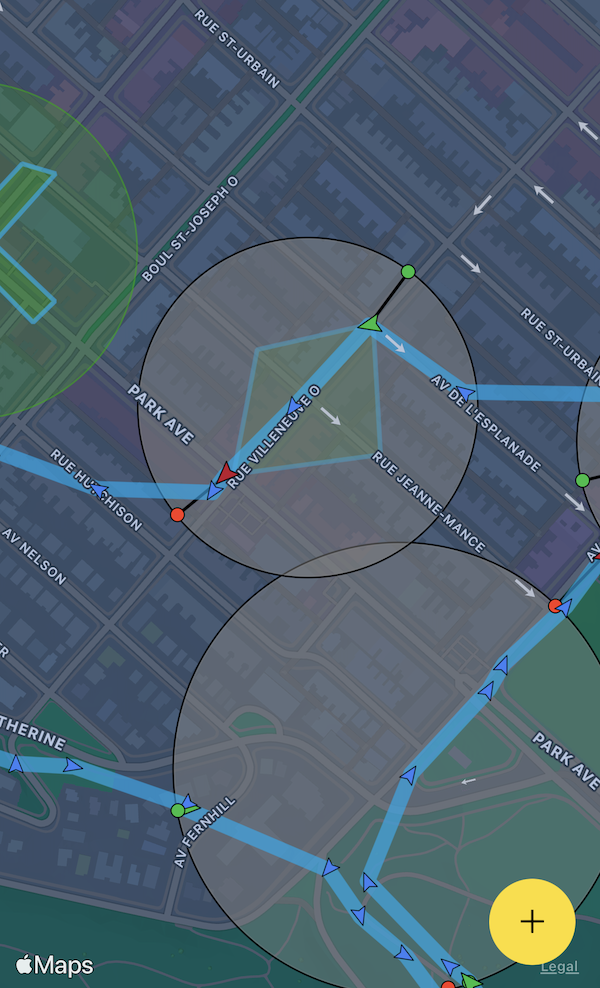
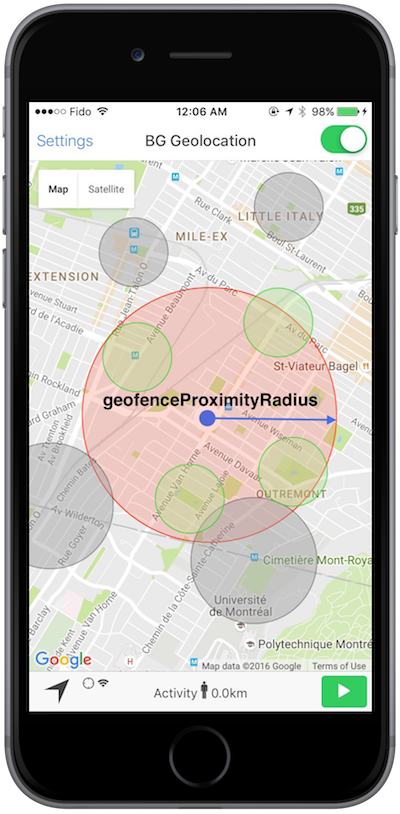
The SDK stores all geofences in its database and uses a geospatial query to activate only the nearest geofences within GeoConfig.geofenceProximityRadius, staying within the platform limit. As the device moves, the active set is periodically refreshed.
- The minimum GeoConfig.geofenceProximityRadius is enforced at
1000meters. - Geofences within the radius (green in the diagram below) are actively monitored.
- Geofences outside the radius (grey) remain in the database but are dormant.
Removing geofences
Geofences persist in the SDK's database until explicitly removed. If
AppConfig.stopOnTerminate is false and
AppConfig.startOnBoot is true, geofences continue to be
monitored across app termination and device reboots.
const geofences = await BackgroundGeolocation.getGeofences();
console.log("[getGeofences]", geofences);
Geofences-only mode
Call BackgroundGeolocation.startGeofences instead of BackgroundGeolocation.start to monitor geofences without continuous location tracking. Use GeoConfig.geofenceModeHighAccuracy to improve event responsiveness at the cost of higher power usage.
The SDK can switch between full tracking and geofences-only mode at any time by calling the corresponding start method.
BackgroundGeolocation.onGeofence((event) => {
  console.log("[onGeofence]", event);
});

await BackgroundGeolocation.ready({
  http: { url: "https://your.server.com/geofences", autoSync: true },
  geolocation: { geofenceModeHighAccuracy: true }
});
BackgroundGeolocation.startGeofences();
Examples
BackgroundGeolocation.onGeofence((event) => {
  if (event.identifier === "DANGER_ZONE") {
    if (event.action === "ENTER") {
      // Entering the zone — switch to full location tracking.
      BackgroundGeolocation.start();
    } else if (event.action === "EXIT") {
      // Exiting the zone — return to geofences-only mode.
      BackgroundGeolocation.startGeofences();
    }
  }
});

BackgroundGeolocation.addGeofence({
  identifier: "DANGER_ZONE",
  radius: 1000,
  latitude: 45.51921926,
  longitude: -73.61678581,
  notifyOnEntry: true,
  notifyOnExit: true,
});

await BackgroundGeolocation.ready({
  geolocation: {
    desiredAccuracy: BackgroundGeolocation.DesiredAccuracy.High,
    distanceFilter: 10,
  },
  http: { url: "https://your.server.com/locations", autoSync: true }
});
BackgroundGeolocation.startGeofences();
Single geofence
BackgroundGeolocation.addGeofence({
  identifier: "Home",
  radius: 200,
  latitude: 45.51921926,
  longitude: -73.61678581,
  notifyOnEntry: true,
  notifyOnExit: true,
  extras: { route_id: 1234 }
});
Multiple geofences
await BackgroundGeolocation.addGeofences([{
  identifier: "Home",
  radius: 200,
  latitude: 45.51921926,
  longitude: -73.61678581,
  notifyOnEntry: true,
}, {
  identifier: "Work",
  radius: 200,
  latitude: 45.61921927,
  longitude: -73.71678582,
  notifyOnEntry: true
}]);
Polygon geofence
BackgroundGeolocation.addGeofence({
  identifier: "Park",
  notifyOnEntry: true,
  notifyOnExit: true,
  vertices: [
    [45.518947279987714, -73.6049889209514],
    [45.5182711292279,   -73.60338649600598],
    [45.517082240237634, -73.60432670908212],
    [45.51774871402813,  -73.60604928622278]
  ]
});
Remove a single geofence
Remove all geofences
Fetch all stored geofences
const geofences = await BackgroundGeolocation.getGeofences();
console.log("[getGeofences]", geofences);
Geofences-only mode
BackgroundGeolocation.onGeofence((event) => {
  console.log("[onGeofence]", event);
});

await BackgroundGeolocation.ready({
  http: { url: "https://your.server.com/geofences", autoSync: true },
  geolocation: { geofenceModeHighAccuracy: true }
});
BackgroundGeolocation.startGeofences();
Toggle between location tracking and geofences-only mode
BackgroundGeolocation.onGeofence((event) => {
  if (event.identifier === "DANGER_ZONE") {
    if (event.action === "ENTER") {
      // Entering the zone — switch to full location tracking.
      BackgroundGeolocation.start();
    } else if (event.action === "EXIT") {
      // Exiting the zone — return to geofences-only mode.
      BackgroundGeolocation.startGeofences();
    }
  }
});

BackgroundGeolocation.addGeofence({
  identifier: "DANGER_ZONE",
  radius: 1000,
  latitude: 45.51921926,
  longitude: -73.61678581,
  notifyOnEntry: true,
  notifyOnExit: true,
});

await BackgroundGeolocation.ready({
  geolocation: {
    desiredAccuracy: BackgroundGeolocation.DesiredAccuracy.High,
    distanceFilter: 10,
  },
  http: { url: "https://your.server.com/locations", autoSync: true }
});
BackgroundGeolocation.startGeofences();
Members
entryState
entryState?: number;
Current entry state of the geofence.
| Value | State |
|---|---|
0 |
Outside |
1 |
Inside |
extras
Arbitrary key-value metadata attached to each geofence event and included in the payload posted to HttpConfig.url.
hits
Number of times this geofence has been triggered since it was added.
identifier
Unique identifier for this geofence.
Used to reference the geofence in events and removal calls. Adding a geofence with an identifier that already exists replaces the existing one.
latitude
Latitude of the circular geofence center.
Omit when defining a polygon geofence via vertices — the SDK
calculates the center automatically.
loiteringDelay
Minimum time in milliseconds the device must remain inside the geofence
before a notifyOnDwell event fires. Default 0.
longitude
Longitude of the circular geofence center.
Omit when defining a polygon geofence via vertices — the SDK
calculates the center automatically.
notifyOnDwell
Fire a GeofenceEvent when the device has remained inside this
geofence for loiteringDelay milliseconds.
notifyOnEntry
Fire a GeofenceEvent when the device enters this geofence.
See also - GeoConfig.geofenceInitialTriggerEntry
notifyOnExit
Fire a GeofenceEvent when the device exits this geofence.
radius
Radius of the circular geofence in meters.
Omit when defining a polygon geofence via vertices — the SDK
calculates the enclosing radius automatically.
Warning
The minimum reliable radius is 200 meters. Below this threshold,
geofences may not trigger reliably on either platform.
Apple documents this explicitly:
"For testing purposes, you can assume that the minimum distance is approximately 200 meters."
stateUpdatedAt
Epoch timestamp in seconds of the last geofence transition.
vertices
vertices?:Vertices;
Polygon geofence vertices as [[lat, lng], ...] pairs.
When provided, the geofence is treated as a polygon rather than a circle.
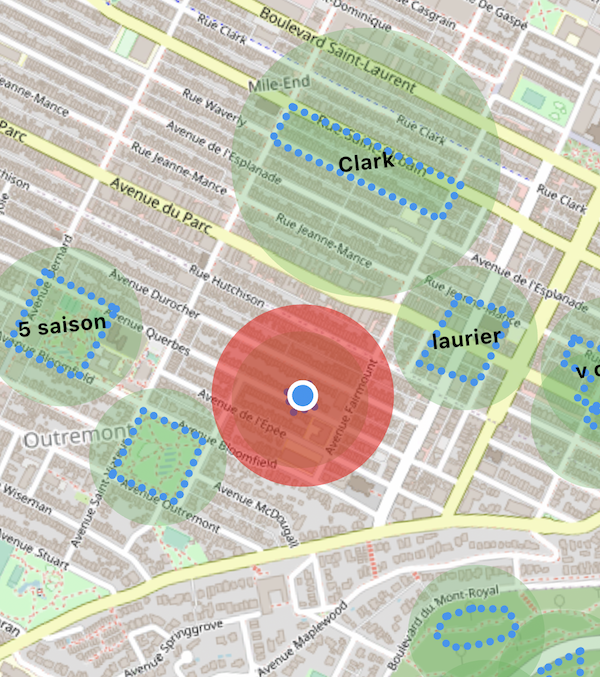
Omit latitude, longitude, and radius — the SDK
solves the minimum enclosing circle
from the vertex geometry and registers that as the native circular geofence.
When the device enters the enclosing circle, the SDK begins C++ hit-testing against the polygon at high frequency. When it exits the circle, polygon monitoring ceases.
BackgroundGeolocation.addGeofence({
  identifier: "Home",
  notifyOnEntry: true,
  notifyOnExit: true,
  vertices: [
    [45.518947279987714, -73.6049889209514],
    [45.5182711292279,   -73.60338649600598],
    [45.517082240237634, -73.60432670908212],
    [45.51774871402813,  -73.60604928622278]
  ]
});