ActivityConfig
Activity recognition configuration for the background geolocation SDK.
ActivityConfig controls how the SDK interprets transitions between moving
and stationary states using platform motion APIs (Android Activity Recognition
and iOS Core Motion).
Contents
Overview
| Category | Properties | Notes |
|---|---|---|
| Recognition cadence | activityRecognitionInterval, minimumActivityRecognitionConfidence |
How often and how confidently the SDK polls platform motion APIs. |
| Stop detection | disableStopDetection, stopOnStationary, stopDetectionDelay |
Controls when the SDK transitions to stationary and stops tracking. stopDetectionDelay is iOS only. |
| Motion trigger | motionTriggerDelay, triggerActivities |
Controls which activities start tracking and how quickly. motionTriggerDelay is Android only. |
| Permission | disableMotionActivityUpdates |
Opt out of Motion & Fitness / Physical Activity permission requests. |
BackgroundGeolocation.ready({
  activity: {
    // Poll activity recognition every 10 seconds (both platforms)
    activityRecognitionInterval: 10000,

    // Require ≥75% confidence before changing activity (both platforms)
    minimumActivityRecognitionConfidence: 75,

    // Disable automatic stop detection (both platforms)
    disableStopDetection: false,

    // Automatically stop when stationary (both platforms)
    stopOnStationary: true,

    // Delay motion-trigger transitions by 30s (Android only)
    motionTriggerDelay: 30000,

    // Disable platform motion activity APIs (both platforms)
    disableMotionActivityUpdates: false,

    // Delay stop-detection by 10s (iOS only)
    stopDetectionDelay: 10000
  }
});
Stop detection
The SDK uses platform motion APIs to detect when the device has stopped moving and transitions to the stationary state. In that state, location services are paused to conserve battery.
- ActivityConfig.disableStopDetection disables this mechanism entirely. With it off, location services run continuously.
- ActivityConfig.stopOnStationary takes it a step further — the SDK
calls
stop()on itself when the GeoConfig.stopTimeout elapses, ending all tracking. - ActivityConfig.stopDetectionDelay (iOS only) adds a grace period before the stop-detection system engages, preventing false stops at traffic lights or brief pauses.
Motion trigger
When in the stationary state, the SDK waits for a motion event before re-engaging location tracking:
- ActivityConfig.triggerActivities limits which activity types can trigger the transition to moving. By default all moving activities trigger.
- ActivityConfig.motionTriggerDelay (Android only) adds a delay before
committing to the moving state. If the device returns to
stillbefore the delay expires, the transition is cancelled.
See also - Config.activity
// Legacy (deprecated)
BackgroundGeolocation.ready({
  activityRecognitionInterval: 10000,
  disableStopDetection: true,
  stopOnStationary: true
});
// Current
BackgroundGeolocation.ready({
  activity: {
    activityRecognitionInterval: 10000,
    disableStopDetection: true,
    stopOnStationary: true
  }
});
Members
activityRecognitionInterval
Interval in milliseconds between motion-activity polls. Defaults to
10000 ms (10 seconds).
Lower values increase responsiveness to state changes at the cost of
additional battery use. The minimum supported value is 500 ms.
disableMotionActivityUpdates
Disables the SDK's request for Motion & Fitness (iOS) or Physical
Activity (Android 10+) permission. Defaults to false.
Set to true to suppress the permission request. The SDK remains
functional but without motion data it relies on less efficient fallback
mechanisms to detect moving/stationary transitions.
iOS
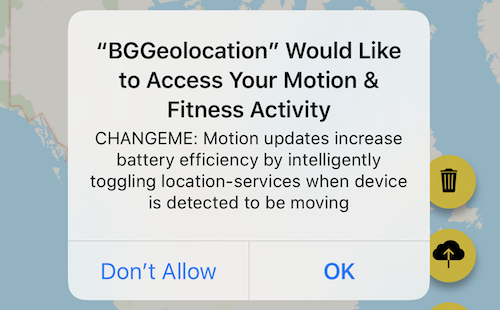
The SDK is highly optimized around motion-activity updates. Disabling
them increases battery consumption. Provide an
NSMotionUsageDescription in your Info.plist to explain the benefit
to users — for example:
"Motion activity detection increases battery efficiency by intelligently toggling location tracking off when your device is stationary."
Android
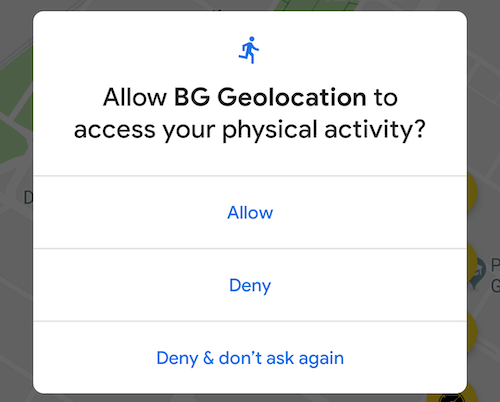
Android 10+ requires runtime permission for Physical Activity. Without it, the SDK falls back to a stationary geofence mechanism — the device must move 200–500 m before tracking re-engages, compared to just a few meters when the Motion API is authorized.
disableStopDetection
Disables the motion-activity-based stop-detection system. Defaults to
false.
iOS
Disables the accelerometer-based stop-detection system. When disabled, the SDK falls back to the default iOS behaviour of automatically turning off location services after the device has been stationary for exactly 15 minutes. GeoConfig.stopTimeout has no effect in this state.
To prevent iOS from ever turning off location services automatically,
also set GeoConfig.pausesLocationUpdatesAutomatically to false.
BackgroundGeolocation.ready({
  activity: {
    disableStopDetection: true,
  },
  geolocation: {
    pausesLocationUpdatesAutomatically: false
  }
});
Warning
With the above configuration, iOS location services will never turn off and the battery will drain rapidly. Use this only when you have explicit start/stop controls in your app (for example, a workout app with Start / Stop buttons calling BackgroundGeolocation.changePace).

Android
Location services will never turn off while disableStopDetection is
true. The only way to stop tracking is to call
BackgroundGeolocation.changePace false or
BackgroundGeolocation.stop explicitly.
minimumActivityRecognitionConfidence
Minimum confidence level (0–100) required before a detected activity triggers a moving/stationary state change.
Defaults to 70 on iOS and 75 on Android. Higher values reduce
false-positive transitions but may cause the SDK to react more slowly
to genuine activity changes.
motionTriggerDelay
Android only Adds a delay in milliseconds before the SDK commits to the moving state
when the Motion API reports movement. Defaults to 0 (no delay).
When the Motion API reports a moving activity (e.g. on_foot,
in_vehicle), the SDK waits motionTriggerDelay milliseconds before
transitioning to moving and starting location tracking. If the Motion
API returns to still before the delay expires, the transition is
cancelled. This prevents false-positive triggers when briefly moving
around a stationary location (for example, walking around a home).
The following log shows a device detecting on_foot but returning to
still before the delay expires, cancelling the transition:
 04-08 10:58:03.419 TSLocationManager: ╔═════════════════════════════════════════════
 04-08 10:58:03.419 TSLocationManager: ║ Motion Transition Result
 04-08 10:58:03.419 TSLocationManager: ╠═════════════════════════════════════════════
 04-08 10:58:03.419 TSLocationManager: ╟─ 🔴  EXIT: still
 04-08 10:58:03.419 TSLocationManager: ╟─ 🎾  ENTER: on_foot
 04-08 10:58:03.419 TSLocationManager: ╚═════════════════════════════════════════════
 04-08 10:58:03.416 TSLocationManager:   ⏰ Scheduled OneShot: MOTION_TRIGGER_DELAY in 30000ms
 .
 . <motionTriggerDelay timer started>
 .
 04-08 10:58:19.385 TSLocationManager: ╔═════════════════════════════════════════════
 04-08 10:58:19.385 TSLocationManager: ║ Motion Transition Result
 04-08 10:58:19.385 TSLocationManager: ╠═════════════════════════════════════════════
 04-08 10:58:19.385 TSLocationManager: ╟─ 🔴  EXIT: on_foot
 04-08 10:58:19.385 TSLocationManager: ╟─ 🎾  ENTER: still
 04-08 10:58:19.385 TSLocationManager: ╚═════════════════════════════════════════════
 04-08 10:58:19.381 TSLocationManager: [c.t.l.s.TSScheduleManager cancelOneShot]
 04-08 10:58:19.381 TSLocationManager:   ⏰ Cancel OneShot: MOTION_TRIGGER_DELAY <-- timer cancelled
stopDetectionDelay
iOS only Delays the iOS stop-detection system from engaging after the device
becomes stationary. Defaults to 0 (engage immediately). When the stop-detection system engages, location services are temporarily
turned off and only the accelerometer is monitored. The delay timer starts
when the device is detected as stationary and is cancelled if any movement
is detected before it expires. Setting stopDetectionDelay to a non-zero
value helps avoid false stops at traffic lights or brief pauses.
Enable LoggerConfig.debug to observe stop-detection in action — the SDK emits a sound effect and local notifications when location services toggle on and off.
stopOnStationary
Automatically calls BackgroundGeolocation.stop when the
GeoConfig.stopTimeout elapses. Defaults to false.
When the SDK transitions to the stationary state and the
stopTimeout timer expires, the SDK calls stop() on itself — ending
all tracking. The next tracking session must be started manually.
Warning
stopOnStationary fires only when the GeoConfig.stopTimeout
timer elapses naturally. It does not fire when
BackgroundGeolocation.changePace false is called manually.
BackgroundGeolocation.ready({
  activity: {
    stopOnStationary: true,
  }
}).then(() => {
  BackgroundGeolocation.start();
});
triggerActivities
triggerActivities?:TriggerActivity|TriggerActivity[];
Restricts which detected activities can trigger a transition from the stationary state to the moving state.
By default the SDK triggers on any moving activity: in_vehicle,
on_bicycle, on_foot, running, or walking. Configure this to
limit tracking to specific use cases — for example, vehicles only.
See TriggerActivity for all valid activity names.
Warning
Using triggerActivities requires the user to grant the
Motion & Fitness (iOS) or Physical Activity (Android 10+)
permission.