BGGeo
public classBGGeo
Primary SDK API — the single entry point for all geolocation, geofencing, HTTP sync, and configuration operations.
Contents
Overview
The SDK operates around a motion-based state machine: it tracks aggressively while the device is moving and pauses location services when stationary, delivering high-quality background tracking with minimal battery impact.
| Area | Key methods |
|---|---|
| Lifecycle | ready, start, stop, setConfig, reset |
| Location | getCurrentPosition, watchPosition, getOdometer |
| Geofencing | addGeofence, startGeofences, onGeofence |
| Events | onLocation, onMotionChange, onHttp, onProviderChange |
| Persistence | getLocations, getCount, sync, destroyLocations |
| Background tasks | startBackgroundTask, stopBackgroundTask |
Lifecycle
Think of the SDK like a stereo receiver:
-
Wiring the speakers — Register event listeners (
onLocation,onGeofence, etc.) before callingready. The SDK buffers events untilreadyresolves, so listeners registered afterward may miss them. You do not need to remove listeners when you callstop— the SDK simply stops emitting events when it isn't running. -
Plugging in the power cord —
readyinitializes the SDK, restores persisted state, and applies your configuration. Call it once per launch, before any method that acquires a location or requests permissions. Your config is not applied untilreadyresolves. -
The power button —
startandstopbegin and halt location tracking. The SDK persists its enabled state across launches. If the app is terminated while tracking is active, the next call toreadywill automatically resume tracking — you do not need to callstartagain.
Always call ready on every launch — no exceptions. The SDK buffers all events from the
moment the app starts, and holds them until ready is called. If your app launches and
never calls ready, the SDK sits silently waiting: no events fire, no locations are
recorded, no uploads are attempted. It does not matter whether tracking was already active
from a previous session — ready is the signal that tells the SDK your app is alive and
listening. This is why the method is named ready.
Calling methods before ready resolves is perfectly fine, provided they do not request
a location or trigger a permission dialog. Methods that only read from the SDK's SQLite
database are safe — for example getState, getLocations, getGeofences,
removeGeofences. Avoid start, requestPermission, getCurrentPosition, and
watchPosition until after ready resolves. The SDK defaults apply until your config
arrives — calling a permission-sensitive method too early will use those defaults, not
your configured values.
Configuration
The SDK uses a compound-configuration model. Options are grouped into typed sub-interfaces (GeolocationConfig, HttpConfig, AppConfig, etc.) passed as a single Config object. All SDK constants are available as strongly-typed enum namespaces on the default export:
- LogLevel
DesiredAccuracy- PersistMode
Event
Events
Each onX method returns a Subscription that must be removed when
no longer needed:
These can also be imported individually
Examples
Compound configuration
let bgGeo = BGGeo.shared
bgGeo.ready { config in
    config.geolocation.desiredAccuracy = kCLLocationAccuracyBest
    config.geolocation.distanceFilter = 20
    config.http.url = "https://example.com/locations"
    config.http.autoSync = true
    config.persistence.maxDaysToPersist = 7
}
Event listeners
let bgGeo = BGGeo.shared
let locationSub = bgGeo.onLocation { location in
    print("New location: \(location)")
}

let motionSub = bgGeo.onMotionChange { event in
    print("Device is moving? \(event.isMoving)")
}
Removing event listeners
let bgGeo = BGGeo.shared
var subscriptions = Set<EventSubscription>()

let subscription = bgGeo.onHttp { event in
    // Handle event
}
// EventSubscription auto-removes on deinit; or store in a Set:
subscription.store(in: &subscriptions)
Getting started
let bgGeo = BGGeo.shared
bgGeo.ready { config in
    config.geolocation.distanceFilter = 10
    config.http.url = "https://example.com/locations"
    config.http.autoSync = true
}

if !bgGeo.enabled {
    Task {
        try await bgGeo.start()
    }
}
Events
onActivityChange
public func onActivityChange(_ callback: @escaping (ActivityChangeEvent) -> Void) -> EventSubscription
Subscribe to motion-activity changes.
Fires each time the activity-recognition system reports a new activity
(still, on_foot, in_vehicle, on_bicycle, running).
Android
ActivityChangeEvent.confidence always reports 100.
let bgGeo = BGGeo.shared
let subscription = bgGeo.onActivityChange { event in
    print("[onActivityChange] \(event.activity) (\(event.confidence)%)")
}
activitychange
onAuthorization
public func onAuthorization(_ callback: @escaping (AuthorizationEvent) -> Void) -> EventSubscription
Subscribe to Config.authorization events.
Fires when AuthorizationConfig.refreshUrl responds, either
successfully or not. On success, AuthorizationEvent.success is
true and AuthorizationEvent.response contains the decoded JSON
response. On failure, AuthorizationEvent.error contains the error
message.
let bgGeo = BGGeo.shared
let subscription = bgGeo.onAuthorization { event in
    if event.isSuccess {
        print("[authorization] SUCCESS:", event.response)
    } else {
        print("[authorization] ERROR:", event.error ?? "")
    }
}
authorization
onConnectivityChange
public func onConnectivityChange(_ callback: @escaping (ConnectivityChangeEvent) -> Void) -> EventSubscription
Subscribe to network connectivity changes.
Fires when the device's network connectivity transitions between connected
and disconnected. By default, the SDK also fires this event at
start time with the current connectivity state. When connectivity
is restored and the SDK has queued locations, it automatically initiates
an upload to HttpConfig.url.
let bgGeo = BGGeo.shared
let subscription = bgGeo.onConnectivityChange { event in
    print("[onConnectivityChange] hasConnection:", event.hasConnection)
}
connectivitychange
onEnabledChange
public func onEnabledChange(_ callback: @escaping (EnabledChangeEvent) -> Void) -> EventSubscription
Subscribe to changes in plugin State.enabled.
Fires when State.enabled changes. Calling start or
stop triggers this event.
let bgGeo = BGGeo.shared
let subscription = bgGeo.onEnabledChange { event in
    print("[onEnabledChanged] isEnabled? \(event.enabled)")
}
enabledchange
onGeofence
public func onGeofence(_ callback: @escaping (GeofenceEvent) -> Void) -> EventSubscription
Subscribe to geofence transition events.
Fires when any monitored geofence crossing occurs.
See also
- 📘 Geofencing Guide
let bgGeo = BGGeo.shared
let subscription = bgGeo.onGeofence { event in
    print("[onGeofence] \(event)")
}
geofence
onGeofencesChange
public func onGeofencesChange(_ callback: @escaping (GeofencesChangeEvent) -> Void) -> EventSubscription
Subscribe to changes in the set of actively monitored geofences.
Fires when the SDK's active geofence set changes. The SDK can monitor any number of geofences in its database — even thousands — despite native platform limits (20 for iOS; 100 for Android). It achieves this with a geospatial query that activates only the geofences nearest to the device's current location (see GeolocationConfig.geofenceProximityRadius). When the device is moving, the query runs periodically and the active set may change — that change triggers this event.
See also
- 📘 Geofencing Guide
let bgGeo = BGGeo.shared
let subscription = bgGeo.onGeofencesChange { event in
    let on = event.on    // new geofences activated
    let off = event.off  // geofences that were just de-activated

    // Create map circles
    on.forEach { geofence in
        print("[geofencesChange] activated: \(geofence.identifier)")
    }

    // Remove map circles
    off.forEach { identifier in
        print("[geofencesChange] deactivated: \(identifier)")
    }
}
geofenceschange
onHeartbeat
public func onHeartbeat(_ callback: @escaping (HeartbeatEvent) -> Void) -> EventSubscription
Subscribe to periodic heartbeat events.
Fires at each AppConfig.heartbeatInterval while the device is in
the stationary state. On iOS, AppConfig.preventSuspend must
also be true to receive heartbeats in the background.
Note
The LocationEvent provided by the HeartbeatEvent is only the
last-known location — the heartbeat does not engage location services. To
fetch a fresh location inside your callback, call getCurrentPosition.
let bgGeo = BGGeo.shared
bgGeo.ready { config in
    config.app.heartbeatInterval = 60
    config.app.preventSuspend = true
}

let subscription = bgGeo.onHeartbeat { event in
    print("[onHeartbeat] \(event)")

    // You could request a new location if you wish.
    Task {
        do {
            let location = try await bgGeo.getCurrentPosition(samples: 1, persist: true)
            print("[getCurrentPosition] \(location)")
        } catch {
            print("[getCurrentPosition] ERROR: \(error)")
        }
    }
}
heartbeat
onHttp
public func onHttp(_ callback: @escaping (HttpEvent) -> Void) -> EventSubscription
Subscribe to HTTP responses from your server HttpConfig.url.
See also
- HTTP Guide
let bgGeo = BGGeo.shared
let subscription = bgGeo.onHttp { response in
    let status = response.statusCode
    let success = response.isSuccess
    let responseText = response.responseText
    print("[onHttp] \(response)")
}
http
onLocation
public func onLocation(_ callback: @escaping (LocationEvent) -> Void) -> EventSubscription
Subscribe to location events.
Every location recorded by the SDK is delivered to your callback, including
locations from onMotionChange, getCurrentPosition, and
watchPosition.
Error Codes
If the native location API fails, the error callback receives a
LocationError code.
Note
During onMotionChange and getCurrentPosition, the SDK
requests multiple location samples to find the most accurate fix. These
intermediate samples are not persisted, but are delivered to this
callback with LocationEvent.sample set to true. Filter out sample
locations before manually posting to your server.
let bgGeo = BGGeo.shared
let subscription = bgGeo.onLocation { location in
    print("[onLocation] success: \(location)")
}
location
onMotionChange
public func onMotionChange(_ callback: @escaping (LocationEvent) -> Void) -> EventSubscription
Subscribe to motion-change events.
Fires each time the device transitions between the moving and stationary states.
Warning
When a motion-change event fires, HttpConfig.autoSyncThreshold is ignored — all queued locations are uploaded immediately. The SDK flushes eagerly before going dormant (moving→stationary) and immediately after waking up (stationary→moving).
See also - GeolocationConfig.stopTimeout
let bgGeo = BGGeo.shared
let subscription = bgGeo.onMotionChange { event in
    if event.isMoving {
        print("[onMotionChange] Device has just started MOVING \(event)")
    } else {
        print("[onMotionChange] Device has just STOPPED: \(event)")
    }
}
motionchange
onPowerSaveChange
public func onPowerSaveChange(_ callback: @escaping (PowerSaveChangeEvent) -> Void) -> EventSubscription
Subscribe to OS power-saving mode changes.
Fires when the operating system's power-saving mode is enabled or disabled. Power-saving mode can throttle background services such as GPS and HTTP uploads.
See also
- isPowerSaveMode
iOS
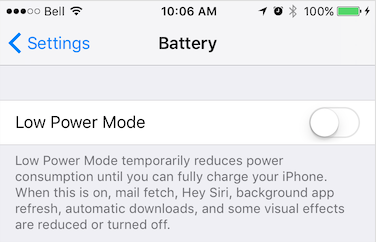
Power Saving mode is enabled manually in Settings → Battery or via an automatic OS prompt.
Android
Battery Saver is enabled manually in Settings → Battery → Battery Saver or automatically when the battery drops below a configured threshold.

let bgGeo = BGGeo.shared
let subscription = bgGeo.onPowerSaveChange { event in
    print("[onPowerSaveChange] isPowerSaveMode: \(event.isPowerSaveMode)")
}
powersavechange
onProviderChange
public func onProviderChange(_ callback: @escaping (ProviderChangeEvent) -> Void) -> EventSubscription
Subscribe to location-services authorization changes.
Fires whenever the state of the device's location-services authorization
changes (e.g. GPS enabled, WiFi-only, permission revoked). The SDK also
fires this event immediately after ready completes, so you always
receive the current authorization state on each app launch.
See also
- getProviderState
let bgGeo = BGGeo.shared
let subscription = bgGeo.onProviderChange { event in
    print("[onProviderChange] \(event)")

    switch event.status {
    case .denied:
        print("- Location authorization denied")
    case .authorizedAlways:
        print("- Location always granted")
    case .authorizedWhenInUse:
        print("- Location WhenInUse granted")
    default:
        break
    }
}
providerchange
onSchedule
Subscribe to AppConfig.schedule events.
Fires each time a schedule event activates or deactivates tracking.
Check state.enabled in your callback to determine whether tracking
was started or stopped.
let bgGeo = BGGeo.shared
let subscription = bgGeo.onSchedule { event in
    if event.enabled {
        print("[onSchedule] scheduled start tracking")
    } else {
        print("[onSchedule] scheduled stop tracking")
    }
}
schedule
Methods
changePace
Manually toggle the SDK's motion state between stationary and moving.
Passing true immediately engages location services and begins tracking,
bypassing stationary monitoring. Passing false turns off location
services and returns the SDK to the stationary state.
Use this in workout-style apps where you want explicit start/stop control independent of the device's motion sensors.
let bgGeo = BGGeo.shared
bgGeo.changePace(true)  // <-- Location-services ON ("moving" state)
bgGeo.changePace(false) // <-- Location-services OFF ("stationary" state)
getCurrentPosition
public func getCurrentPosition( timeout: TimeInterval = 10, desiredAccuracy: CLLocationAccuracy = 5, maximumAge: Int = 0, samples: Int = 3, allowStale: Bool = true, persist: Bool = true, label: String? = "getCurrentPosition", extras: [String: Any]? = nil ) async throws ->LocationEvent
Retrieve the current LocationEvent.
Instructs the SDK to fetch a single location at maximum power and
accuracy. The location is persisted to SQLite and posted to
HttpConfig.url just like any other recorded location. If an error
occurs, the promise rejects with a LocationError.
Options
See CurrentPositionRequest.
Error Codes
See LocationError.
Note
The SDK requests multiple location samples internally to find the best
fix. All intermediate samples are delivered to onLocation with
LocationEvent.sample set to true. Filter these out if you are
manually posting locations to your server.
let bgGeo = BGGeo.shared
Task {
    do {
        let location = try await bgGeo.getCurrentPosition(
            timeout: 30,
            desiredAccuracy: 10,
            maximumAge: 5000,
            samples: 3,
            extras: ["route_id": 123]
        )
        print("[getCurrentPosition]", location)
    } catch {
        print("Error: \(error)")
    }
}
ready
public func ready( reset: Bool = true, transistorAuthorizationToken token: TransistorToken? = nil, _ configure: @escaping (Config) -> Void )
Signal to the SDK that your app is launched and ready, supplying the default Config.
Call ready exactly once per app launch, before calling start.
The SDK applies your configuration, restores persisted state, and prepares
for tracking. On subsequent launches after first install, it loads the
persisted configuration and merges your supplied Config on top.
See Config.reset for finer control over this behaviour.
Warning
Call ready once per app launch from your application root — not inside a
component or behind a UI action. On iOS, the OS can relaunch your app in
the background when the device starts moving; if ready is not called in
that path, tracking will not resume.
See also
- Config.reset
- setConfig
let bgGeo = BGGeo.shared
bgGeo.ready { config in
    config.geolocation.desiredAccuracy = kCLLocationAccuracyBest
    config.geolocation.distanceFilter = 10
    config.app.stopOnTerminate = false
    config.app.startOnBoot = true
    config.http.url = "http://your.server.com"
    config.http.headers = ["my-auth-token": "secret-token"]
}
print("[ready] success")
let bgGeo = BGGeo.shared
bgGeo.config.reset()
// Reset to documented default-values with overrides
bgGeo.config.batchUpdate { config in
    config.geolocation.distanceFilter = 10
}
removeListeners
Remove all event listeners.
Calls Subscription.remove on all active subscriptions.
resetOdometer
public func resetOdometer( timeout: TimeInterval = 10, desiredAccuracy: CLLocationAccuracy = kCLLocationAccuracyBest, maximumAge: Int = 5000, samples: Int = 3, persist: Bool = true, extras: [String: Any]? = nil ) async throws ->LocationEvent
Reset the odometer to 0.
Internally performs a getCurrentPosition to record the exact
location where the odometer was reset. Equivalent to
.setOdometer(0).
let bgGeo = BGGeo.shared
Task {
    do {
        let location = try await bgGeo.setOdometer(0)
        // This is the location where odometer was set at.
        print("[setOdometer] success: \(location)")
    } catch {
        print("[setOdometer] error: \(error)")
    }
}
setOdometer
public func setOdometer( _ value: CLLocationDistance, timeout: TimeInterval = 10, desiredAccuracy: CLLocationAccuracy = kCLLocationAccuracyBest, maximumAge: Int = 5000, samples: Int = 3, persist: Bool = true, extras: [String: Any]? = nil ) async throws ->LocationEvent
Set the odometer to an arbitrary value.
Internally performs a getCurrentPosition to record the exact
location where the odometer was set.
let bgGeo = BGGeo.shared
Task {
    do {
        let location = try await bgGeo.setOdometer(1234.56)
        // This is the location where odometer was set at.
        print("[setOdometer] success: \(location)")
    } catch {
        print("[setOdometer] error: \(error)")
    }
}
start
Enable location and geofence tracking.
This is the SDK's power ON switch. The SDK enters its stationary state, acquires an initial location, then turns off location services until motion is detected. On Android, the Activity Recognition System monitors for motion; on iOS, a stationary geofence is created around the current location.
Note
If a AppConfig.schedule is configured, start overrides the
schedule and begins tracking immediately.
See also
- stop
- startGeofences
let bgGeo = BGGeo.shared
Task {
    do {
        try await bgGeo.start()
        print("[start] success")
    } catch {
        print("[start] error: \(error)")
    }
}
startGeofences
Switch to geofences-only tracking mode.
In this mode no active location tracking occurs — only geofences are
monitored. Use the usual stop method to exit geofences-only mode.
start and startGeofences are mutually exclusive — call one or the
other, never both. start enables full tracking: location recording and
geofence monitoring run together. startGeofences enables geofence monitoring
only, with no continuous location recording. Calling start while already
in geofences-only mode (or vice versa) switches modes; there is no need to call
stop first.
See also
- stop
- 📘 Geofencing Guide
let bgGeo = BGGeo.shared

// Add a geofence.
let geofence = Geofence(
    identifier: "ZONE_OF_INTEREST",
    radius: 200,
    latitude: 37.234232,
    longitude: 42.234234,
    notifyOnExit: true
)
Task {
    try await bgGeo.geofences.add(geofence)
}

// Listen to geofence events.
let subscription = bgGeo.onGeofence { event in
    print("[onGeofence] - \(event)")
}

// Configure the plugin
bgGeo.ready { config in
    config.http.url = "http://my.server.com"
    config.http.autoSync = true
}

// Start monitoring geofences.
Task {
    try await bgGeo.startGeofences()
}
startSchedule
Activate the configured AppConfig.schedule.
Initiates the schedule defined in AppConfig.schedule. The SDK
automatically starts or stops tracking according to the schedule. To halt
scheduled tracking, call stopSchedule.
See also
- AppConfig.schedule
- stopSchedule
stop
Disable location and geofence monitoring.
This is the SDK's power OFF switch.
Note
If a AppConfig.schedule is configured, stop does not halt
the scheduler. Call stopSchedule explicitly if you also want to
stop scheduled tracking (for example, on user logout).
// Later when you want to stop the Scheduler (e.g., user logout)
let bgGeo = BGGeo.shared
bgGeo.stopSchedule()
stopSchedule
Halt scheduled tracking.
Warning
stopSchedule does not call stop if the SDK is currently
tracking. Call stop explicitly if you also want to end the current
tracking session.
See also
- startSchedule
// Later when you want to stop the Scheduler (e.g., user logout)
let bgGeo = BGGeo.shared
bgGeo.stopSchedule()
if bgGeo.enabled {
    bgGeo.stop()
}
watchPosition
public func watchPosition( interval: Double = 1000, timeout: TimeInterval = 60, persist: Bool = false, extras: [String: Any]? = nil, success: @escaping (LocationEvent) -> Void, failure: @escaping (Error) -> Void ) -> Int
Start a continuous stream of location updates.
Each location is persisted to SQLite (when the SDK is State.enabled)
and posted to HttpConfig.url if HTTP is configured. Returns a
Subscription that must be retained to halt the stream.
Warning
watchPosition is designed for foreground use only — not for long-term
background monitoring. The SDK's motion-based tracking model does not
require it.
iOS
watchPosition continues running in the background, preventing iOS from
suspending your app. Remove the subscription in your app's suspend handler
to avoid draining the battery.
let bgGeo = BGGeo.shared
var watchId: Int?

func onResume() {
    watchId = bgGeo.watchPosition(
        interval: 1000,
        extras: ["foo": "bar"],
        success: { location in
            print("[watchPosition] - \(location)")
        },
        failure: { error in
            print("[watchPosition] ERROR - \(error)")
        }
    )
}

func onSuspend() {
    if let id = watchId {
        bgGeo.stopWatchPosition(id)
        watchId = nil
    }
}
Properties
app
public let app =App()
App API — background-task and power-save utilities.
authorization
public let authorization =Authorization()
Authorization API — request and monitor location permissions.
config
public let config =Config()
Config API — read and update the SDK configuration.
geofences
public let geofences =GeofenceManager()
Access to the GeofenceManager — add, remove, and query geofences.
logger
public let logger =Logger()
Logger API
sensors
public let sensors =Sensors()
Sensors API — query the device motion hardware.
state
public var state:State
Read-only snapshot of the SDK's current runtime state.
let state = bgGeo.state
if state.enabled && state.isMoving {
    print("Tracking in motion, odometer: \(state.odometer)")
}
store
public let store =DataStore()
DataStore API — query, upload, and destroy persisted location records.