DeviceSettings Android only
open classDeviceSettings
API for directing users to Android device settings screens that can affect background geolocation performance.
Many Android manufacturers apply aggressive battery optimizations that can kill background services, including the geolocation SDK. This API surfaces the relevant settings screens so users can whitelist your app.
For a comprehensive list of affected devices and manufacturers, see dontkillmyapp.com.
val bgGeo = BGGeo.instance

val isIgnoring = bgGeo.deviceSettings.isIgnoringBatteryOptimizations
if (!isIgnoring) {
    val req = bgGeo.deviceSettings.requestIgnoreBatteryOptimizations()
    if (req != null && !req.seen) {
        bgGeo.deviceSettings.showIgnoreBatteryOptimizations()
    }
}
Members
isIgnoringBatteryOptimizations
Android only Returns true if the OS is ignoring battery optimizations for your app.
In most cases the SDK performs acceptably even when battery optimizations are active, but aggressive manufacturer-specific restrictions may interfere with background operation.
isPowerSaveMode
Returns the current state of the operating system's power-saving mode.
Power-saving mode can throttle background services such as GPS and HTTP uploads.
See also
- onPowerSaveChange to subscribe to future changes.
iOS
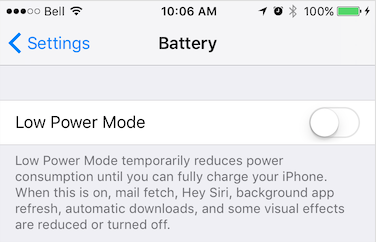
Power Saving mode is enabled manually in Settings → Battery or via an automatic OS prompt.
Android
Battery Saver is enabled manually in Settings → Battery → Battery Saver or automatically when the battery drops below a configured threshold.

show
Android only Execute a previously prepared DeviceSettingsRequest to open the target settings screen.
Resolves true if the redirect was attempted.
val bgGeo = BGGeo.instance

val powerRequest = bgGeo.deviceSettings.requestPowerManager()
if (powerRequest != null && !powerRequest.seen) {
    bgGeo.deviceSettings.showPowerManager()
}
showIgnoreBatteryOptimizations
Android only Prepare a request to show the Android Ignore Battery Optimizations settings screen.
Returns a DeviceSettingsRequest rather than immediately redirecting, so you can inspect DeviceSettingsRequest.seen and decide whether to prompt the user.
Warning
On some devices and OS versions this screen may not be available. Always
wrap calls to DeviceSettings.show in a try/catch.
See also
- isIgnoringBatteryOptimizations
- show
showPowerManager
Android only Prepare a request to show a vendor-specific Power Manager settings screen (Huawei, Xiaomi, Vivo, Oppo, etc.).
Returns a DeviceSettingsRequest rather than immediately redirecting.
Warning
Not all manufacturers or OS versions implement this screen. Always wrap
calls to DeviceSettings.show in a try/catch.
See also
- show